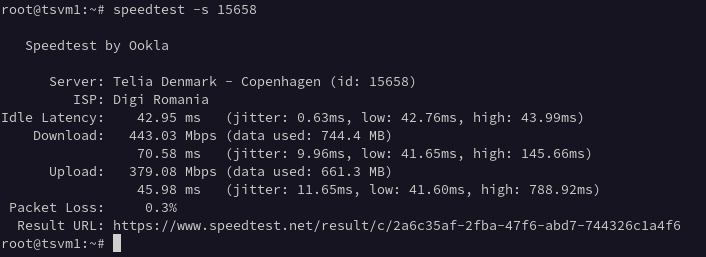
We just launched our biggest NVMe VPS so far: TSM8NVME120 — 4 vCPU, 8 GB RAM and 120 GB NVMe storage on AMD Ryzen 5700G, for €7.96/month. That is under €1 per GB of RAM, with unlimited traffic.
What you get
4 vCPU (Ryzen 5700G) and 8 GB RAM — real headroom for multi-service setups
120 GB NVMe — roughly 50% more storage than comparable EU plans at this price
Unlimited traffic, 1x IPv4 included, full root access
Free backup from the control panel and self-service OS reinstall (Debian, Ubuntu, Rocky, Alma — same IP, minutes)
SSH keys are generated in your browser during setup — the private key never touches our servers
Who is it for?
This plan is aimed at workloads that keep hitting the ceiling on 4 GB: Docker stacks with several containers, busy WordPress or WooCommerce sites, PostgreSQL/MySQL databases, mail servers with filtering, or a small Kubernetes node. If you are unsure how much RAM you actually need, our plan comparison guide walks through the trade-offs.
If you are comparing a cheap VPS in Romania, the right choice depends on workload, network quality and a clear upgrade path — not only the monthly price. This guide explains what a low-cost NVMe VPS should still include in 2026, compares the available plans by use case, and helps you pick the smallest plan that comfortably runs your project.
Short answer: for most projects, the best cheap VPS in Romania in 2026 is an NVMe plan with a dedicated IPv4, unlimited traffic and monthly billing. Start with the 1 GB TSM1NVME10 (from €2.48/mo) for lean workloads like a VPN or a small site, or the 2 GB TSM2NVME20 (€3.48/mo) as a balanced default for production WordPress. All plans run on NVMe storage in a Bucharest (EU) location with fast provisioning and no contract.
What a cheap VPS should still include
Budget should not mean cutting the essentials. Before looking at price, confirm the plan includes:
NVMe storage — far better responsiveness for app and database workloads than SATA SSD.
A dedicated IPv4 address — required for most production use, email reputation and direct access.
Unlimited traffic — no surprise overage bills as you grow.
Monthly billing, no contract — pay as you go and scale on your own schedule.
Fast provisioning — your server should be online within minutes of payment.
Local EU latency — a Romania (Bucharest) location keeps response times low across Europe.
Cheap NVMe VPS plans in Romania (2026)
Here is the current TinyServers line-up. Every plan includes a dedicated IPv4, unlimited traffic, NVMe storage and monthly billing — the table adds a suggested use case so you can match a plan to your workload:
Not sure which to pick? Start with TSM2NVME20 as a low-cost default, and upgrade later if monitoring shows you need more.
Romania-local provider vs global cloud
Large global clouds are flexible, but for a small, cost-sensitive project they often add costs that are easy to miss. Here is how a Romania-based NVMe VPS compares on the points that matter most for a budget:
What you pay for
Romania-local NVMe VPS
Typical global cloud
Dedicated IPv4
Included
Often billed separately (~$3–5/mo)
Bandwidth
Unlimited
Metered, with overage fees
Billing
Monthly, no contract
Monthly, but cost climbs fast above the entry tier
Latency for EU users
Low (Bucharest)
Depends on chosen region
Support
Direct (sales, billing, technical)
Tiered / ticket queues
Which plan should you choose?
1 GB (TSM1NVME10): lean, predictable workloads — a small website, a VPN, a Telegram or Discord bot, a staging or learning environment.
2–4 GB (TSM2NVME20 / TSV2NVME40): the default for most production WordPress sites, control panels and internal tools.
8 GB (TSM8NVME120): heavier apps, multiple sites, databases and containers that need real headroom.
A good rule: start one tier above your absolute minimum, then scale only when monitoring confirms sustained pressure. Upgrades are simple, so you do not need to over-buy on day one. For a deeper breakdown, see our guide on 1 GB vs 2 GB vs 4 GB VPS, and real numbers in our NVMe VPS benchmarks.
Frequently asked questions
What is the cheapest VPS in Romania with a dedicated IPv4?
The TSM1NVME10 plan starts at €2.48/mo and includes 1 vCPU, 1 GB RAM, 10 GB NVMe storage, a dedicated IPv4 address and unlimited traffic. It is the lowest-cost entry point for a real production VPS rather than a trial.
Is unlimited traffic really included?
Yes. Every plan includes unlimited traffic with no metered bandwidth and no overage charges, so your monthly cost stays the same as usage grows.
What VPS size is enough for WordPress?
A 2 GB plan (TSM2NVME20) is a comfortable default for most production WordPress sites. Move up to 4 GB once monitoring shows sustained CPU or memory pressure. See our WordPress VPS checklist for sizing details.
Can I host a VPN on a Romanian VPS?
Yes. A 1 GB plan is enough for a personal WireGuard or OpenVPN endpoint, with low latency for users across Europe and a dedicated IPv4 included.
Where are the servers located?
In Bucharest, Romania (EU), which keeps latency low across Europe.
Do I need a contract?
No. Billing is monthly with no long-term commitment, and provisioning is automatic within minutes of payment.
Most VPS users get one IPv4 address with their plan and never think about it again. But the moment you start hosting multiple SSL sites without SNI, running a mail server with proper per-domain reputation, building a small VPN provider, or separating tenants on a single box, that single IP becomes a hard wall. This guide explains when you actually need extra IPv4, how to choose between a single address and a routed /29, /28 or /27 subnet, and how to order and configure one on a TinyServers NVMe VPS.
Why one IPv4 is sometimes not enough
Here are the real-world scenarios where customers reach out for additional addresses:
Mail server with multiple domains. SMTP reputation is tied to the sending IP. Mixing transactional and marketing mail on a single address means one bad campaign can poison delivery for everything else. A small subnet lets you bind each domain or each traffic class to its own IP and PTR record.
Multiple SSL sites for legacy clients. SNI covers the modern web, but if you have to support old TLS clients, IoT devices, or some payment gateways, every certificate still needs its own IPv4.
VPN exit nodes. WireGuard and OpenVPN endpoints, especially commercial or per-user exits, benefit from distinct public IPs to avoid CGNAT-like blacklisting and to give each tenant a clean address.
Multi-tenant hosting and reverse proxies. Agencies running many small sites on one VPS often want to give each customer a dedicated public IP for billing, isolation, or to allow customers to point their own DNS without coordinating.
Outbound proxy or scraping pools. Rotating across a /28 or /27 spreads request volume and reduces rate-limit collisions.
NAT and lab segmentation. Routed subnets give you a clean L3 block to NAT internal containers or LXC guests behind, with no bridging tricks.
If none of those describe you, a single extra IPv4 at €1.00/month is almost always the right starting point. If two or more apply, a routed subnet is cheaper per address and far easier to manage long-term.
Single IPv4 vs routed subnet — what changes
A single extra IPv4 is added to your existing VPS interface as an alias. From the OS side it looks like:
ip addr add 203.0.113.45/32 dev eth0
It works for SMTP, extra HTTPS vhosts, or a second VPN endpoint, but it is not a network you can subdivide.
A routed subnet is different. The provider routes the entire block (a /29, /28, or /27) to your VPS as the next hop. You receive the subnet on a separate interface or as additional addresses, and you control the inside however you want — bind addresses to services, assign them to LXC/Docker containers, NAT internal networks behind them, or build a small lab network. There is no MAC-layer dependency, no bridging, no provider ARP magic. The traffic for any address in the block lands on your VPS because the upstream routes it there.
The practical implication: a routed subnet behaves like a real network you own, not like a list of aliases. That is exactly what you need for containers, NAT, or per-tenant isolation.
The decision table: /29 vs /28 vs /27
All three TinyServers routed subnets are billed monthly with no setup fee. Here is how they compare on cost-per-usable-IP:
Validated use case where /28 is too tight — proxy pools, larger VPN providers
Three rules of thumb:
Start with /29 unless you have a written list of 6+ addresses you will use in month one. Most customers who jump straight to /28 underuse it for the first quarter.
If you are between /28 and /27, take the /28 and grow. Upgrading later is straightforward; over-provisioning IPv4 is expensive and increasingly frowned upon by RIRs.
If you genuinely need /26 or larger, contact us directly. Anything above /27 is reviewed case-by-case and is not orderable from the cart.
Configuring a routed /29 on a Linux VPS
Once the subnet is provisioned, you will receive the block (for example 203.0.113.40/29) and the gateway your VPS already uses. There is no separate gateway for the routed block — your VPS itself is the gateway for that subnet.
The fastest, distribution-agnostic way to bring addresses up is the ip command — it works identically on Debian, Ubuntu, Rocky and Alma:
# add the addresses you want to use
ip addr add 203.0.113.41/29 dev eth0
ip addr add 203.0.113.42/29 dev eth0
ip addr add 203.0.113.43/29 dev eth0
You only need to add the addresses you actually plan to bind to services — the rest of the block is still routed to your VPS and you can add them later without downtime.
These commands are not persistent across reboots. To make the configuration survive a restart, write it into the network manager your distribution uses by default:
Ubuntu 24.04 — add the extra addresses under ethernets.eth0.addresses in /etc/netplan/*.yaml, then run netplan apply.
Debian 12 — add an up ip addr add ... line for each address under the iface eth0 stanza in /etc/network/interfaces.
Rocky 9 / Alma 9 — use nmcli connection modify <conn> +ipv4.addresses 203.0.113.41/29 (repeat per address), then nmcli connection up <conn>.
In all cases the addresses behave the same once they are up — the choice is purely about how your distribution stores network state.
Quick sanity test from another machine:
for ip in 41 42 43; do ping -c1 -W1 203.0.113.$ip; done
Bind a service to a specific IP — for example, an extra Nginx vhost:
Per-IP rDNS is available on request — open a ticket with the IP and the desired PTR. This is essential for mail servers; without correct PTR, most receivers will defer or reject your messages.
Three real customer patterns
1. Small mail host on a 4 GB VPS
A consultancy hosts mail for six client domains on TSM4NVME40. They added a /29 and assigned one IP per domain, with matching PTR records. Result: deliverability issues from one client’s newsletter no longer affect the other five. Total cost: €5.46 + €8.90 = €14.36/month for six independently reputable mail IPs.
2. Agency hosting 12 small WordPress sites
A web agency runs a dozen low-traffic sites on a single 2 GB VPS. They took a /28 so each customer gets a dedicated public IP — useful for legacy DNS setups customers manage themselves and for billing transparency. Cost per customer for the IP: roughly €1/month, baked into the hosting fee.
3. WireGuard VPN provider, beta phase
A small VPN startup runs WireGuard on a 4 vCPU VPS and rotates exits across a /28. When they outgrew it (week three), they upgraded to a /27. Lesson learned: they should have started with a /29 to validate the model and then jumped to /27 directly.
What we do not allow
Routed subnets are reviewed manually before allocation. Use cases that will be rejected:
Bulk unsolicited email or anything resembling cold-mail at scale
Open proxies or open resolvers exposed to the public internet
Address hoarding — ordering a /27 with no concrete plan to use the IPs
Reselling individual IPv4 addresses as a standalone product
If your project is sensitive to abuse complaints (large-scale crawling, marketing email, anonymization services), tell us upfront. We would rather have an honest conversation than reclaim addresses later.
How to order
Make sure you have an active TinyServers VPS. Routed subnets are not standalone products — they require a VPS as the routing target.
Complete the order. The first allocation requires manual review. Once approved, we will email you the block, confirm the gateway your VPS already uses, and handle any rDNS requests you send in.
Configure the block on your VPS using the ip commands above (and the persistent equivalent for your distribution) and start binding services.
If you are unsure which size fits, the safe answer is almost always start with /29. The €6 difference per month between /29 and /28 is much smaller than the cost of unused address space sitting idle for six months.
FAQ
How many usable IPs do I get in a /29, /28 or /27?
A routed /29 gives you 6 usable IPv4 addresses, a /28 gives 14 and a /27 gives 30. Two addresses per block are reserved for network and broadcast — and because the whole block is routed to your VPS, no extra address is lost to a gateway, unlike on-link allocations. Full reference: subnet size table & calculator (/30 to /24).
Can I upgrade from /29 to /28 later?
Yes. The new block is routed alongside the old one — you keep using the /29 addresses while you migrate services, then we deprovision the smaller block when you are ready. No forced renumbering.
Do I get the addresses immediately?
Provisioning is manual to keep abuse rates low. Once your order is approved, the block is routed within minutes and you can configure it on your VPS.
Do I need a TinyServers VPS to order?
Yes. Routed subnets are add-ons for existing VPS plans — they have to terminate somewhere, and we route them to a VPS in your account. If you do not have one yet, start with a small NVMe plan from €2.48/month and add the subnet on top.
Can I use the addresses on a non-TinyServers server?
No. Routed blocks are tied to a TinyServers VPS as the next hop. We cannot announce them to a third-party network from the storefront product — that requires a separate BGP arrangement.
What about /26 or larger?
Available, but not from the cart. Contact us with your use case and projected utilization timeline.
Summary
Extra IPv4 is one of those line items that looks small but quietly unblocks entire classes of projects — proper mail hosting, multi-tenant agency setups, VPN services, container labs. If you only need one or two extra addresses, the single IPv4 add-on is the right call. If you need a real network you can subdivide, start with a /29, grow into a /28, and only step up to a /27 once you have validated the use case.
Pair any of them with one of our NVMe VPS plans in Romania and you have a clean, low-cost foundation for projects that have outgrown a single public IP.
Budget VPS plans can be excellent if you choose based on workload, not only monthly price. This guide helps you select a cheap NVMe VPS in Romania while keeping enough headroom for real traffic.
What to evaluate before price
Storage type: NVMe changes responsiveness for app and database workloads.
CPU generation and contention risk under peak usage.
Local latency for your user base.
Clear, simple upgrade path when demand increases.
Common low-cost mistakes
Buying minimum RAM for production WordPress.
Ignoring background jobs and cron impact.
No monitoring, then upgrading only after incidents.
Over-buying from day one without validated demand.
Plan sizing pattern that works
Start with 1 GB only for lean and predictable workloads. Use 2 GB as default for most production web apps. Move to 4 GB when real monitoring data confirms sustained pressure.
Choosing the right VPS size is one of the biggest decisions for cost and stability. This guide compares 1 GB, 2 GB and 4 GB NVMe VPS plans using practical workloads instead of generic specs.
Quick decision table
Monthly VPS plan snapshot, checked 19 September 2026
A stack that also benefits from additional CPU capacity
Prices are a dated snapshot in RON, not a permanent quote. Check each linked product page and checkout for the current amount. EUR display values can change with the exchange rate.
At these prices, moving from 2 GB to 4 GB / 2 vCPU adds 2.60 RON/month (about 14%) for twice the RAM and storage, with the same vCPU count. This can be useful when memory or disk capacity is the constraint; it does not mean twice the performance. The 4 GB / 4 vCPU option costs another 7.80 RON/month over 4 GB / 2 vCPU.
These are sizing guidelines, not traffic guarantees. Test your application’s peak workload and leave headroom for updates and background tasks. Use free -h, vmstat 1, disk usage and application response-time metrics together. A high memory-used percentage alone is not a reason to upgrade; consider available memory, active swapping and out-of-memory events.
1 GB VPS profile
A 1 GB plan is ideal when you keep the stack lean and predictable. It works best for low-traffic services and utility workloads.
A 2 GB plan can be a sensible lower-cost starting point for a small cached WordPress site or compact application. Confirm that the database, workers and update jobs fit with headroom. If you already expect memory pressure, compare the 4 GB / 2 vCPU option rather than treating 2 GB as the universal best value.
Choose 4 GB when the workload needs more memory from the start or measurements show that 2 GB is too tight. Both variants below provide 40 GB NVMe storage: choose 2 vCPU when memory is the main constraint, or consider 4 vCPU when CPU-bound work can run in parallel. Extra vCPU does not guarantee a proportional speed increase.
It can suit a lean, low-traffic service. A small cached website, VPN or bot may fit, but a heavier WordPress setup or several services needs more memory. Test your own peak workload before choosing.
When should I jump from 2 GB to 4 GB?
Consider 4 GB when measurements show persistent memory pressure, out-of-memory events or active swapping that slows the application. Check CPU, storage and application bottlenecks too; more RAM does not fix every slowdown.
Which plan gives best price-performance?
There is no single best plan for every workload. The 2 GB plan keeps cost lower, while the 4 GB / 2 vCPU plan is worth comparing when memory or storage is the constraint. Choose 4 GB / 4 vCPU when the application can use additional CPU capacity.
What is the difference between the two 4 GB VPS plans?
Both include 4 GB RAM and 40 GB NVMe storage. TSV2NVME40 has 2 vCPU; TSM4NVME40 has 4 vCPU. The higher vCPU count can help parallel workloads, but does not guarantee twice the application throughput.
How do I request a VPS upgrade?
Contact support from your client area to request a larger plan. Keep a current application-level backup and confirm any maintenance window before the change. Do not assume an automatic, interruption-free resize.
How quickly is a VPS activated?
VPS orders are normally provisioned automatically within minutes after successful payment and service checks. This is not a guarantee of instant activation; consult the service FAQ for the ordering process.
A 2 GB VPS is often the best balance between price and usable performance for small production workloads. It gives you more headroom than a 1 GB VPS, while still keeping monthly costs low. For many websites, lightweight applications and small business services, 2 GB RAM is a practical starting point.
If you need a VPS for a small WordPress site, a control panel, a few light services or a development stack that should feel stable under normal use, 2 GB RAM is usually the safer choice. It is a better fit than 1 GB when the server is not just for testing, but for something that people actually rely on. You can deploy a 2 GB NVMe VPS in Romania from €3.48/mo, with NVMe storage, IPv4 included and full root access — see the real-world NVMe benchmarks for what to expect.
For 2026 deployments, 2 GB remains the balanced default when the service has real users but does not yet justify a multi-service 4 GB stack. Validate the choice with memory, swap, queue and response-time monitoring.
Good use cases for a 2 GB VPS
A 2 GB VPS is a strong fit for:
small to medium WordPress websites
websites with moderate traffic
development and staging environments
bots, automation and API services
small control panel installs
lightweight Docker setups
VPN, proxy or monitoring servers with extra headroom
Compared to 1 GB RAM, a 2 GB VPS is more forgiving. You have more space for the operating system, background services and traffic spikes without hitting memory limits as quickly.
When 2 GB RAM is enough
A 2 GB VPS is usually enough when:
you run one main website or application
your traffic is still moderate
your plugins or services are not heavy
you want a stable small production environment
you need room for growth without jumping straight to a larger plan
For many users, this is the point where a VPS stops feeling entry-level and starts feeling practical for real workloads.
When you should choose 4 GB instead
You should usually start with 4 GB RAM if you plan to run:
multiple active websites
heavier WordPress installs
larger databases
several Docker containers
memory-hungry control panels
busier ecommerce or client projects
If you already know the workload is commercial, heavier or expected to grow soon, 4 GB will give you more margin and reduce the need for an early upgrade.
2 GB VPS vs 1 GB VPS
Choose a 1 GB VPS if:
you want the lowest cost
the project is small
you are testing, learning or running a single lightweight service
Choose a 2 GB VPS if:
the server matters for real users
you want better stability
you need more room for plugins, services or background tasks
you want a better balance between cost and performance
For most small production workloads, 2 GB RAM is the more practical default.
2 GB VPS vs 4 GB VPS
Choose 2 GB RAM if:
you need a budget-friendly production VPS
you run one main service
the workload is still relatively light
you want a safe upgrade from 1 GB
Choose 4 GB RAM if:
you run multiple services
you need more performance margin
you want to reduce upgrade pressure
your workload is already business-critical
How to choose the right plan
If you are choosing between 1 GB, 2 GB and 4 GB, think in terms of risk:
1 GB is best for lightweight and non-critical workloads
2 GB is best for small production use
4 GB is best when stability, growth and flexibility matter more
For many users, 2 GB VPS is the sweet spot because it keeps costs reasonable while giving enough RAM for a much wider range of real use cases.
Need help choosing?
A 2 GB VPS is often the right starting point if you want something affordable but usable for real traffic and daily workloads. If the project is very small, 1 GB may still be enough. If you already expect higher load or multiple services, start with 4 GB.
Change your mind anytime: self-service OS reinstall
A production server should start from the right base image. Every TinyServers VPS — including the 2 GB NVMe VPS — now supports self-service OS reinstallation from the client panel: open My Virtual Machines, click Reinstall OS and choose Debian 13, Ubuntu 24.04 LTS, Rocky Linux 9 or AlmaLinux 9. The server is redeployed in minutes, it keeps the same IPv4 address, and a backup is taken automatically before the old system is removed.
This makes it easy to start on one distribution, test your stack, and switch to another without tickets, manual rescue images or IP changes.
Quick FAQ
Is 2 GB RAM enough for WordPress?
Yes. For many small to medium WordPress websites, 2 GB RAM is a solid starting point, especially with caching and a lightweight setup.
Can I run a control panel on a 2 GB VPS?
Yes, for lighter setups. If you expect multiple hosted sites or heavier usage, more RAM may be needed.
Is 2 GB VPS enough for Docker?
Yes, for small Docker workloads. For several containers or memory-heavy services, 4 GB is safer.
Can I reinstall the operating system on a 2 GB VPS?
Yes. OS reinstallation is self-service from the panel: pick Debian, Ubuntu, Rocky Linux or AlmaLinux and the VPS is redeployed in minutes, keeping the same IP address.
Should I choose 2 GB or 4 GB?
Choose 2 GB for small production workloads and 4 GB when you expect heavier usage, more services or faster growth.
Need a VPS that is still affordable but strong enough for real workloads? A 2 GB NVMe VPS is often the best place to start.
Compare 2 GB VPS with nearby plans
For a lean test server, the 1 GB NVMe VPS keeps cost low. For WordPress, small production apps and services with real users, the 2 GB NVMe VPS gives better memory headroom. If you expect heavier traffic or multiple services, compare it with the 4 GB NVMe VPS.
A 1 GB VPS is a good entry-level choice for lightweight workloads, testing, small personal projects and services that do not need much memory. If you choose fast NVMe storage and a modern CPU, a small VPS can feel responsive for the right use case. The key is to know where 1 GB RAM is enough and where it becomes a bottleneck.
If you want a low-cost VPS for a simple website, a VPN, a small bot or a lightweight Linux environment, 1 GB RAM can be enough. If you expect traffic growth, heavier control panels or multiple services running at the same time, you should usually start from 2 GB RAM.
1 GB RAM vs 1 Gbps: memory and network speed explained
1 GB RAM describes the memory available to the operating system and running applications. 1 Gbps describes a network port speed of one gigabit per second. These are separate specifications: a VPS can have 1 GB of RAM and a 1 Gbps port, and increasing RAM does not automatically increase network speed.
If you are comparing a 1 GB VPS with a 1 Gbps VPS, check both the memory allocation and the network terms. RAM affects how many applications and background services fit in memory. Network performance affects transfers and depends on the route, the remote server, contention and protocol overhead. A port specification is not a guarantee of sustained throughput.
For a small website or bot, choose RAM for the application’s working set. For a VPN or file-transfer workload, also check CPU capacity, the traffic policy and measured network performance. See our VPS benchmarks for measurement context.
All plans include NVMe storage, full root access, free backup, self-service OS reinstall and instant setup. → Deploy a 1 GB NVMe VPS in Romania in minutes, or pick 2 GB / 4 GB for more headroom. Curious about real-world speed? See our NVMe VPS benchmarks.
Prices checked on 16 September 2026. Billing is in RON; EUR amounts are indicative and may change with the exchange rate. Check the linked product pages for current prices and options.
Good use cases for a 1 GB VPS
A 1 GB VPS is usually a good fit for:
small static websites
lightweight WordPress installs with caching
personal VPN servers
Discord bots, Telegram bots or simple automation
development and testing environments
small monitoring or proxy services
Linux learning environments
For these workloads, the main advantages are low monthly cost, fast deployment and enough dedicated resources to run a small project reliably.
1 GB VPS use-case fit matrix
Workload
Good fit?
Keep it lean
Move to 2 GB when…
Static site / reverse proxy
Yes
Nginx or Caddy, limited logs
You add a database or several dynamic apps
Personal WireGuard VPN
Yes
Monitor CPU and network, not only RAM
You add many concurrent users or inspection tools
Small bot or webhook
Yes
One runtime, bounded queues and logs
Workers, queues or caches run continuously
Monitoring agent
Yes
Short retention and modest scrape frequency
You store long-term metrics on the same VPS
Cached WordPress
Conditional
Light theme, few plugins, page cache and swap
It is business-critical, uncached or plugin-heavy
Multi-container stack
Usually no
Only one or two tiny containers
Multiple databases, workers or public services are required
Quick check: after deployment, watch free -h, vmstat 1 and df -h. Sustained swap activity, out-of-memory kills or less than roughly 15% free disk are concrete upgrade signals.
Where a 1 GB VPS starts to struggle
A 1 GB VPS is not the best choice if you want to run:
larger WordPress sites with many plugins
busy ecommerce websites
Docker stacks with several containers
game servers with active usage
control panels that consume a lot of RAM
databases under constant load
In these cases, limited memory becomes the main problem. The server may start swapping, response times may increase and the experience becomes inconsistent under load.
1 GB VPS vs 2 GB VPS
If you are unsure what to choose, the practical comparison is simple.
A 1 GB VPS is better for:
low-budget projects
testing
simple websites
single-purpose services
A 2 GB VPS is better for:
small production websites
WordPress with more plugins
small business services
room for traffic growth
more stable multitasking
If the VPS will be used for anything client-facing or revenue-related, 2 GB RAM is usually the safer starting point.
How to choose the right plan
Choose 1 GB RAM if:
your workload is light
you want the lowest monthly cost
you are testing or learning
one service is the main priority
Choose 2 GB RAM if:
you want more headroom
the site or app matters for your business
you expect growth
you want fewer performance limits
Choose 4 GB RAM if:
you plan to run multiple services
you need a heavier stack
you want more room for scaling without immediate upgrades
Need help choosing?
If you are not sure whether 1 GB, 2 GB or 4 GB RAM is right for your workload, the safest approach is to match the VPS to your actual use case, not just the lowest price. A small website, bot or VPN can run well on 1 GB. For production workloads, 2 GB is often the better balance.
A big part of the value of a cheap 1 GB VPS is being able to experiment without fear. TinyServers now includes self-service OS reinstallation directly from the client panel: open My Virtual Machines, click Reinstall OS, pick a template — Debian 13, Ubuntu 24.04 LTS, Rocky Linux 9 or AlmaLinux 9 — and the VPS is redeployed with a fresh operating system in minutes.
your VPS keeps the same IPv4 address after the reinstall
a backup is taken automatically before the old system is removed
a fresh root SSH key is generated for the new install
no support ticket needed — the whole flow is automated
For a testing or learning VPS this changes how you work: break the system, reinstall, start clean. Try it on a 1 GB NVMe VPS from 13.10 RON/mo (about €2.49).
Quick FAQ
Is 1 GB RAM enough for WordPress?
Yes, for a small WordPress site with caching and a light theme. For heavier plugins or more traffic, 2 GB RAM is safer.
Can I run Docker on a 1 GB VPS?
Yes, but only for very small containers and simple setups. For multi-container workloads, 2 GB or 4 GB is a better choice.
Is a 1 GB VPS good for a VPN?
Yes. A small VPN server is one of the most suitable use cases for a 1 GB VPS.
Can I reinstall the operating system on my VPS?
Yes. Every TinyServers VPS supports self-service OS reinstallation from the panel: choose Debian, Ubuntu, Rocky Linux or AlmaLinux and the server is redeployed in minutes, keeping the same IP address.
When should I upgrade from 1 GB to 2 GB?
Upgrade when memory usage stays high, performance becomes inconsistent, or you start running more than one important service.
Need a low-cost NVMe VPS in Romania? Start with a 1 GB VPS for lightweight workloads or choose 2 GB RAM for more headroom and stability.
Compare the next VPS options
If your 1 GB VPS will run a public website or a small business service, check the upgrade path before choosing. The 2 GB NVMe VPS is the safer starting point for WordPress, apps with background jobs and workloads that need more memory headroom.