Budget VPS plans can be excellent if you choose based on workload, not only monthly price. This guide helps you select a cheap NVMe VPS in Romania while keeping enough headroom for real traffic.
What to evaluate before price
Storage type: NVMe changes responsiveness for app and database workloads.
CPU generation and contention risk under peak usage.
Local latency for your user base.
Clear, simple upgrade path when demand increases.
Common low-cost mistakes
Buying minimum RAM for production WordPress.
Ignoring background jobs and cron impact.
No monitoring, then upgrading only after incidents.
Over-buying from day one without validated demand.
Plan sizing pattern that works
Start with 1 GB only for lean and predictable workloads. Use 2 GB as default for most production web apps. Move to 4 GB when real monitoring data confirms sustained pressure.
A 1 GB VPS is a good entry-level choice for lightweight workloads, testing, small personal projects and services that do not need much memory. If you choose fast NVMe storage and a modern CPU, a small VPS can feel responsive for the right use case. The key is to know where 1 GB RAM is enough and where it becomes a bottleneck.
If you want a low-cost VPS for a simple website, a VPN, a small bot or a lightweight Linux environment, 1 GB RAM can be enough. If you expect traffic growth, heavier control panels or multiple services running at the same time, you should usually start from 2 GB RAM.
1 GB RAM vs 1 Gbps: memory and network speed explained
1 GB RAM describes the memory available to the operating system and running applications. 1 Gbps describes a network port speed of one gigabit per second. These are separate specifications: a VPS can have 1 GB of RAM and a 1 Gbps port, and increasing RAM does not automatically increase network speed.
If you are comparing a 1 GB VPS with a 1 Gbps VPS, check both the memory allocation and the network terms. RAM affects how many applications and background services fit in memory. Network performance affects transfers and depends on the route, the remote server, contention and protocol overhead. A port specification is not a guarantee of sustained throughput.
For a small website or bot, choose RAM for the application’s working set. For a VPN or file-transfer workload, also check CPU capacity, the traffic policy and measured network performance. See our VPS benchmarks for measurement context.
All plans include NVMe storage, full root access, free backup, self-service OS reinstall and instant setup. → Deploy a 1 GB NVMe VPS in Romania in minutes, or pick 2 GB / 4 GB for more headroom. Curious about real-world speed? See our NVMe VPS benchmarks.
Prices checked on 16 September 2026. Billing is in RON; EUR amounts are indicative and may change with the exchange rate. Check the linked product pages for current prices and options.
Good use cases for a 1 GB VPS
A 1 GB VPS is usually a good fit for:
small static websites
lightweight WordPress installs with caching
personal VPN servers
Discord bots, Telegram bots or simple automation
development and testing environments
small monitoring or proxy services
Linux learning environments
For these workloads, the main advantages are low monthly cost, fast deployment and enough dedicated resources to run a small project reliably.
1 GB VPS use-case fit matrix
Workload
Good fit?
Keep it lean
Move to 2 GB when…
Static site / reverse proxy
Yes
Nginx or Caddy, limited logs
You add a database or several dynamic apps
Personal WireGuard VPN
Yes
Monitor CPU and network, not only RAM
You add many concurrent users or inspection tools
Small bot or webhook
Yes
One runtime, bounded queues and logs
Workers, queues or caches run continuously
Monitoring agent
Yes
Short retention and modest scrape frequency
You store long-term metrics on the same VPS
Cached WordPress
Conditional
Light theme, few plugins, page cache and swap
It is business-critical, uncached or plugin-heavy
Multi-container stack
Usually no
Only one or two tiny containers
Multiple databases, workers or public services are required
Quick check: after deployment, watch free -h, vmstat 1 and df -h. Sustained swap activity, out-of-memory kills or less than roughly 15% free disk are concrete upgrade signals.
Where a 1 GB VPS starts to struggle
A 1 GB VPS is not the best choice if you want to run:
larger WordPress sites with many plugins
busy ecommerce websites
Docker stacks with several containers
game servers with active usage
control panels that consume a lot of RAM
databases under constant load
In these cases, limited memory becomes the main problem. The server may start swapping, response times may increase and the experience becomes inconsistent under load.
1 GB VPS vs 2 GB VPS
If you are unsure what to choose, the practical comparison is simple.
A 1 GB VPS is better for:
low-budget projects
testing
simple websites
single-purpose services
A 2 GB VPS is better for:
small production websites
WordPress with more plugins
small business services
room for traffic growth
more stable multitasking
If the VPS will be used for anything client-facing or revenue-related, 2 GB RAM is usually the safer starting point.
How to choose the right plan
Choose 1 GB RAM if:
your workload is light
you want the lowest monthly cost
you are testing or learning
one service is the main priority
Choose 2 GB RAM if:
you want more headroom
the site or app matters for your business
you expect growth
you want fewer performance limits
Choose 4 GB RAM if:
you plan to run multiple services
you need a heavier stack
you want more room for scaling without immediate upgrades
Need help choosing?
If you are not sure whether 1 GB, 2 GB or 4 GB RAM is right for your workload, the safest approach is to match the VPS to your actual use case, not just the lowest price. A small website, bot or VPN can run well on 1 GB. For production workloads, 2 GB is often the better balance.
A big part of the value of a cheap 1 GB VPS is being able to experiment without fear. TinyServers now includes self-service OS reinstallation directly from the client panel: open My Virtual Machines, click Reinstall OS, pick a template — Debian 13, Ubuntu 24.04 LTS, Rocky Linux 9 or AlmaLinux 9 — and the VPS is redeployed with a fresh operating system in minutes.
your VPS keeps the same IPv4 address after the reinstall
a backup is taken automatically before the old system is removed
a fresh root SSH key is generated for the new install
no support ticket needed — the whole flow is automated
For a testing or learning VPS this changes how you work: break the system, reinstall, start clean. Try it on a 1 GB NVMe VPS from 13.10 RON/mo (about €2.49).
Quick FAQ
Is 1 GB RAM enough for WordPress?
Yes, for a small WordPress site with caching and a light theme. For heavier plugins or more traffic, 2 GB RAM is safer.
Can I run Docker on a 1 GB VPS?
Yes, but only for very small containers and simple setups. For multi-container workloads, 2 GB or 4 GB is a better choice.
Is a 1 GB VPS good for a VPN?
Yes. A small VPN server is one of the most suitable use cases for a 1 GB VPS.
Can I reinstall the operating system on my VPS?
Yes. Every TinyServers VPS supports self-service OS reinstallation from the panel: choose Debian, Ubuntu, Rocky Linux or AlmaLinux and the server is redeployed in minutes, keeping the same IP address.
When should I upgrade from 1 GB to 2 GB?
Upgrade when memory usage stays high, performance becomes inconsistent, or you start running more than one important service.
Need a low-cost NVMe VPS in Romania? Start with a 1 GB VPS for lightweight workloads or choose 2 GB RAM for more headroom and stability.
Compare the next VPS options
If your 1 GB VPS will run a public website or a small business service, check the upgrade path before choosing. The 2 GB NVMe VPS is the safer starting point for WordPress, apps with background jobs and workloads that need more memory headroom.
Last updated: 01 Mar 2026 Location: Bucharest, Romania Host platform: AMD Ryzen 5700G nodes with NVMe storage Network port: up to 1 Gbps
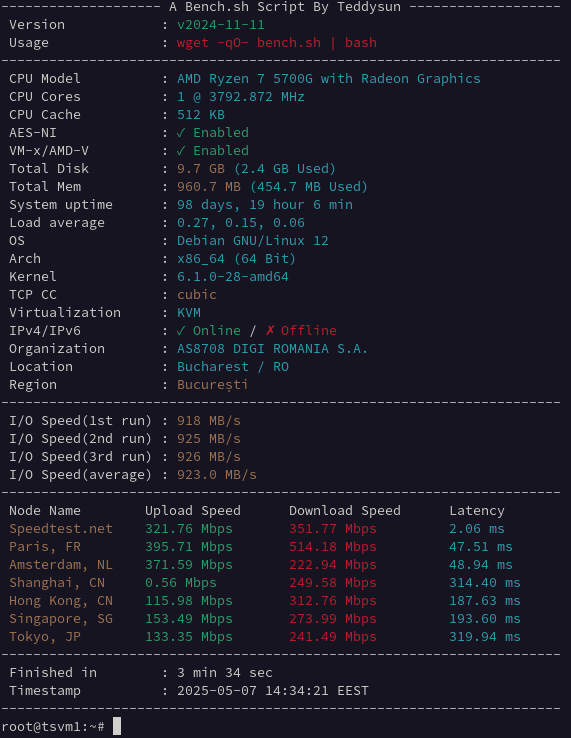
This page is the benchmark hub for TinyServers NVMe VPS plans in Romania. The goal is simple: publish reproducible performance data, explain what those numbers mean in practice, and map each workload to the right VPS size.
Published dataset and test context
Dataset
Test date
Guest plan
Host context
Status
Network snapshot
Aug 2025
TSM1NVME10: 1 vCPU, 1 GB RAM, 10 GB NVMe
AMD Ryzen 5700G node, Bucharest
Published below
Network snapshot
Sep 2025
TSM1NVME10: 1 vCPU, 1 GB RAM, 10 GB NVMe
AMD Ryzen 5700G node, Bucharest
Published below
Current disk I/O
Not yet published
—
—
Reproduction command supplied; no result invented
Only results with a recorded plan, location and date are presented as measurements. The fio command below is a reproducible recipe, not a claim about an unpublished disk score.
Benchmark methodology
Fresh VPS deployment before each test cycle.
No custom kernel tuning unless explicitly stated.
Each network and disk test run multiple times, median reported.
Tools used: speedtest, fio, and standard Linux monitoring commands.
Tests executed at comparable times to reduce peak-hour variance.
If you run your own tests, use at least three runs and compare medians, not single spikes.
Recent network snapshots
Month
Download
Upload
Latency
Plan
Sep 2025
384 Mbps
450 Mbps
2.1 ms
TSM1NVME10
Aug 2025
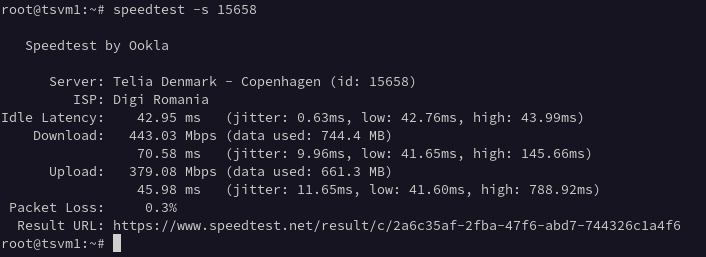
443 Mbps
379 Mbps
8.4 ms
TSM1NVME10
Network throughput changes by destination, peering, and time of day. Use these values as realistic references, not fixed guarantees.
How to interpret benchmark numbers
CPU
For web applications, CPU matters most during concurrent dynamic requests, compression, and background processing. If response times degrade under moderate concurrency, move to a plan with more vCPU headroom.
Disk I/O (NVMe)
Fast disk I/O improves package updates, database operations, cache warmup, and deployment time. For CMS and API workloads, strong NVMe performance is often the difference between smooth and inconsistent behavior under spikes.
Network
Low latency to local users improves page responsiveness and API round-trip times. Throughput is more visible during file transfer, media delivery, and backup windows.