Tag: VPS Plan Comparison

  • 1 GB vs 2 GB vs 4 GB VPS: Which Plan Fits Your Workload?

    1 GB vs 2 GB vs 4 GB VPS: Which Plan Fits Your Workload?

    Choosing the right VPS size is one of the biggest decisions for cost and stability. This guide compares 1 GB, 2 GB and 4 GB NVMe VPS plans using practical workloads instead of generic specs.

    Quick decision table

    Plan Best for Main risk Upgrade signal
    1 GB RAM VPN, static sites, tiny APIs Low memory headroom Frequent swap or RAM over 85 percent
    2 GB RAM WordPress, small production apps Worker contention at peaks Queue lag, plugin-heavy workloads
    4 GB RAM Higher concurrency, multi-service stacks Higher monthly cost Needed when 2 GB stays saturated

    1 GB VPS profile

    A 1 GB plan is ideal when you keep the stack lean and predictable. It works best for low-traffic services and utility workloads.

    2 GB VPS profile

    For most small production apps, 2 GB is the safest default. You get enough memory for caching, moderate concurrency, and cleaner deployments.

    4 GB VPS profile

    Move to 4 GB when your project is already proven and bottlenecks are recurrent, not occasional.

    How to decide in 10 minutes

    1. List always-on services and estimated peak memory.
    2. Check expected concurrency and background jobs.
    3. Start one tier higher if your business cannot tolerate slowdowns during spikes.

    Benchmark reference

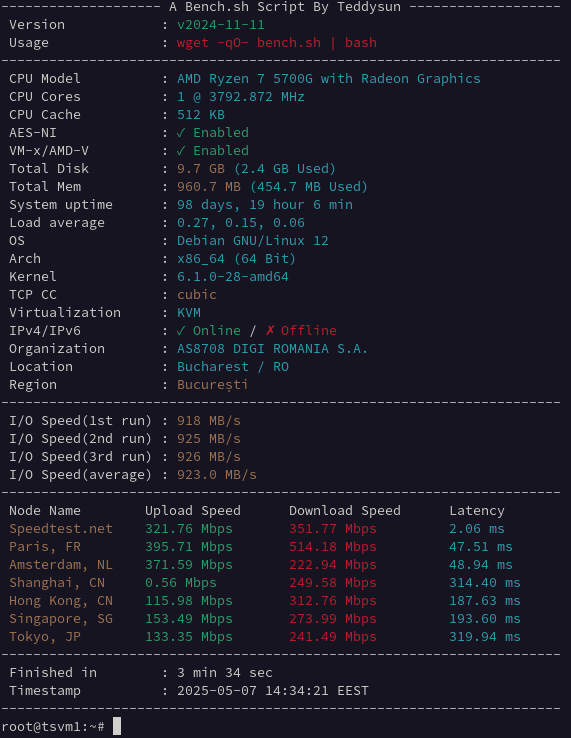
    Before buying, check real measurements from the same infrastructure: NVMe VPS Romania benchmarks.

    FAQ

    Is 1 GB enough for production?

    Yes for lean workloads. For plugin-heavy WordPress or multi-service setups, 2 GB is usually safer.

    When should I jump from 2 GB to 4 GB?

    When monitoring shows sustained high RAM usage, queue lag, or repeated swap under normal traffic.

    Which plan gives best price-performance?

    For many small production projects, 2 GB offers the strongest balance between cost and stability.

    More decision guides

  • 2 GB NVMe VPS: Best Value for Small Production Apps

    2 GB NVMe VPS: Best Value for Small Production Apps

    For most small production workloads, a 2 GB NVMe VPS is the best balance between price and headroom. On TinyServers nodes in Bucharest (Ryzen 5700G + NVMe), 2 GB gives you enough memory to avoid constant swapping while keeping monthly cost low.

    If your current project is outgrowing 1 GB but does not yet justify a larger dedicated setup, this is usually the safest default plan.

    Who should start with 2 GB RAM

    • WordPress websites with a cache plugin, security plugin, and regular admin activity.
    • Small API services (Node, Python, PHP) with 2 to 4 workers.
    • App plus database combinations such as Nginx + PHP-FPM + MariaDB.
    • Two to four lightweight Docker containers without aggressive memory spikes.

    Practical memory budget (realistic, not theoretical)

    A common 2 GB stack often looks like this in production:

    • Operating system and base services: 250 to 350 MB.
    • Nginx + PHP-FPM or app runtime: 300 to 600 MB, depending on traffic.
    • Database (MariaDB or PostgreSQL): 250 to 500 MB.
    • Cache layer (Redis or OPcache growth): 100 to 250 MB.
    • Safety margin for spikes, deployments, cron jobs: 300 to 500 MB.

    On a 1 GB plan, this same stack often starts swapping during traffic bursts or plugin updates. On 2 GB, the same workload has room to breathe.

    Why 2 GB feels much faster than 1 GB

    • Less swap activity means lower latency on admin pages and API responses.
    • More cache headroom reduces CPU cycles per request.
    • Background tasks (backups, workers, cron) stop competing as aggressively with web traffic.
    • Deployments are less risky because package updates and restarts have memory margin.

    Reference setup for a 2 GB production VPS

    # Example baseline stack
    Nginx
    PHP-FPM (pm=ondemand or carefully tuned dynamic)
    MariaDB (small buffer pool first, then tune)
    UFW + fail2ban
    Optional: Redis for object cache
    

    Use conservative service limits first, then raise them only when monitoring confirms sustained demand.

    Monitoring checklist (weekly)

    free -m
    vmstat 1 5
    top -o %MEM
    df -h
    iostat -x 1 3
    
    • If memory usage stays above 85 percent for long periods, review worker limits and cache settings.
    • If swap grows during normal load, tune or upgrade before performance degrades.
    • If queue jobs are delayed, evaluate CPU contention and move to a higher vCPU plan.

    When to upgrade from 2 GB to 4 GB

    • RAM remains above 85 to 90 percent after optimization.
    • You run WooCommerce or multiple WordPress plugins with heavy admin usage.
    • You host multiple containers with scheduled jobs and concurrent requests.
    • You need smoother behavior during traffic peaks, imports, and backups.

    Recommended TinyServers plans

    Related reading

    Quick FAQ

    Is 2 GB enough for WordPress in production?

    Yes, for many small and medium sites, especially with caching and reasonable plugin discipline.

    Can I run Docker on 2 GB?

    Yes, if containers are lightweight and memory limits are configured. Unbounded containers can still exhaust RAM.

    Should I upgrade to 4 GB now or later?

    Start with 2 GB if usage is moderate. Upgrade when monitoring shows sustained memory pressure or queue lag.

    Data-driven sizing examples

    Workload Typical traffic profile 2 GB fit Upgrade trigger
    WordPress company site Low to moderate, daytime peaks Very good Plugin-heavy pages and frequent editor usage
    Small SaaS API Steady requests with background jobs Good Queue growth and worker contention
    Docker micro stack 2 to 4 small services Good with limits OOM kills or sustained swap growth

    Pre-upgrade checklist (before moving to 4 GB)

    1. Cap worker counts and verify memory profile over 7 days.
    2. Enable object cache and verify hit ratio improvement.
    3. Review slow queries and remove unused plugins or modules.
    4. Measure peak-hour latency before and after tuning.

    If these optimizations do not reduce memory pressure, a 4 GB upgrade is justified and usually delivers immediate stability gains.

    Plan Comparison Hub

  • NVMe VPS Romania Benchmarks and Speed Tests (Sep 2025)

    NVMe VPS Romania Benchmarks and Speed Tests (Sep 2025)

    Last updated: 01 Mar 2026
    Location: Bucharest, Romania
    Host platform: AMD Ryzen 5700G nodes with NVMe storage
    Network port: up to 1 Gbps

    This page is the benchmark hub for TinyServers NVMe VPS plans in Romania. The goal is simple: publish reproducible performance data, explain what those numbers mean in practice, and map each workload to the right VPS size.

    Benchmark methodology

    • Fresh VPS deployment before each test cycle.
    • No custom kernel tuning unless explicitly stated.
    • Each network and disk test run multiple times, median reported.
    • Tools used: speedtest, fio, and standard Linux monitoring commands.
    • Tests executed at comparable times to reduce peak-hour variance.

    How to reproduce locally

    sudo apt update && sudo apt install -y speedtest-cli fio
    speedtest
    fio --name=randread --ioengine=libaio --rw=randread --bs=4k --size=1G --numjobs=1 --iodepth=32 --direct=1
    

    If you run your own tests, use at least three runs and compare medians, not single spikes.

    Recent network snapshots

    Month Download Upload Latency Plan
    Sep 2025 384 Mbps 450 Mbps 2.1 ms TSM1NVME10
    Aug 2025 443 Mbps 379 Mbps 8.4 ms TSM1NVME10

    Network throughput changes by destination, peering, and time of day. Use these values as realistic references, not fixed guarantees.

    How to interpret benchmark numbers

    CPU

    For web applications, CPU matters most during concurrent dynamic requests, compression, and background processing. If response times degrade under moderate concurrency, move to a plan with more vCPU headroom.

    Disk I/O (NVMe)

    Fast disk I/O improves package updates, database operations, cache warmup, and deployment time. For CMS and API workloads, strong NVMe performance is often the difference between smooth and inconsistent behavior under spikes.

    Network

    Low latency to local users improves page responsiveness and API round-trip times. Throughput is more visible during file transfer, media delivery, and backup windows.

    Workload mapping by plan size

    • 1 GB RAM: VPN, static sites, lightweight API endpoints, low-traffic tools.
    • 2 GB RAM: WordPress with plugins, small production APIs, app + database combinations.
    • 4 GB RAM: higher concurrency, more workers, larger caches, multiple always-on services.

    For most new production projects, 2 GB is the safest starting point because it avoids early memory bottlenecks while keeping cost low.

    Detailed benchmark articles

    Choose your VPS plan

    Benchmark update policy

    • New measurements are added after major infrastructure or routing changes.
    • When a metric changes significantly, methodology notes are updated on this page.
    • Older data points remain visible for historical comparison.

    Quick FAQ

    Are benchmarks enough to choose a VPS?

    They are a strong starting point, but real usage profile matters more than a single synthetic score.

    Why can my speedtest differ from published results?

    Route selection, test endpoint, and time of day can change throughput and latency.

    What is the safest default for new production projects?

    Most teams should start with 2 GB NVMe and scale up when monitoring shows sustained pressure.

    How benchmarks map to real workloads

    Workload type Main bottleneck Metric to watch first
    CMS websites Memory and database I/O RAM pressure + disk latency
    API backends CPU concurrency Response time under parallel load
    Backup and transfer jobs Network throughput Upload/download consistency

    Benchmark caveats and good practice

    • Single speedtest results can be misleading; use medians and multiple endpoints.
    • Do not compare different providers without normalizing region and test method.
    • Measure during your own peak business window, not only off-peak hours.
    • Validate synthetic benchmarks with application-level metrics.

    Decision matrix for fast plan selection

    • Choose 1 GB when budget is strict and workload is simple.
    • Choose 2 GB for production WordPress, APIs, and mixed app stacks.
    • Choose 4 GB when you need higher concurrency and wider safety margins.

    Need migration help while scaling? Follow the zero-downtime migration guide: How to migrate to TinyServers NVMe VPS.

    Commercial Intent Guides