Choosing the right VPS size is one of the biggest decisions for cost and stability. This guide compares 1 GB, 2 GB and 4 GB NVMe VPS plans using practical workloads instead of generic specs.
Quick decision table
| Plan | vCPU | RAM | NVMe | RON/month | Workload to consider |
|---|---|---|---|---|---|
| TSM1NVME10 | 1 | 1 GB | 10 GB | 13.10 | One lean VPN, bot, static site or tiny API |
| TSM2NVME20 | 2 | 2 GB | 20 GB | 18.30 | Small cached WordPress or a compact application stack |
| TSV2NVME40 | 2 | 4 GB | 40 GB | 20.90 | More cache, plugins or services with moderate CPU demand |
| TSM4NVME40 | 4 | 4 GB | 40 GB | 28.70 | A stack that also benefits from additional CPU capacity |
Prices are a dated snapshot in RON, not a permanent quote. Check each linked product page and checkout for the current amount. EUR display values can change with the exchange rate.
At these prices, moving from 2 GB to 4 GB / 2 vCPU adds 2.60 RON/month (about 14%) for twice the RAM and storage, with the same vCPU count. This can be useful when memory or disk capacity is the constraint; it does not mean twice the performance. The 4 GB / 4 vCPU option costs another 7.80 RON/month over 4 GB / 2 vCPU.
These are sizing guidelines, not traffic guarantees. Test your application’s peak workload and leave headroom for updates and background tasks. Use free -h, vmstat 1, disk usage and application response-time metrics together. A high memory-used percentage alone is not a reason to upgrade; consider available memory, active swapping and out-of-memory events.
1 GB VPS profile
A 1 GB plan is ideal when you keep the stack lean and predictable. It works best for low-traffic services and utility workloads.
- TSM1NVME10 (1 GB) for entry-level deployments.
- Detailed usage guide: Cheap 1 GB VPS use cases.
2 GB VPS profile
A 2 GB plan can be a sensible lower-cost starting point for a small cached WordPress site or compact application. Confirm that the database, workers and update jobs fit with headroom. If you already expect memory pressure, compare the 4 GB / 2 vCPU option rather than treating 2 GB as the universal best value.
- TSM2NVME20 (2 GB) for a compact stack.
- Practical guide: Why 2 GB is the sweet spot.
4 GB VPS profile
Choose 4 GB when the workload needs more memory from the start or measurements show that 2 GB is too tight. Both variants below provide 40 GB NVMe storage: choose 2 vCPU when memory is the main constraint, or consider 4 vCPU when CPU-bound work can run in parallel. Extra vCPU does not guarantee a proportional speed increase.
How to decide in 10 minutes
- List always-on services and estimated peak memory.
- Check expected concurrency and background jobs.
- Choose headroom for measured peaks, then test response times and backup/restore procedures; a larger plan is not an availability guarantee.
Benchmark reference
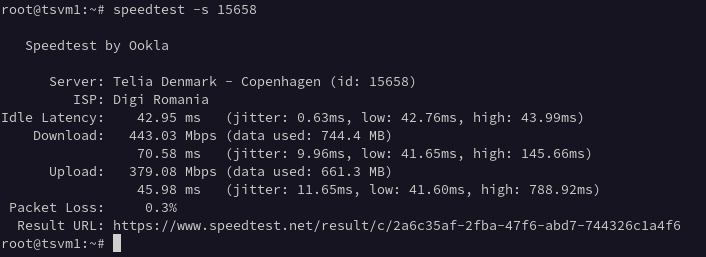
Before buying, check real measurements from the same infrastructure: NVMe VPS Romania benchmarks.
FAQ
Is 1 GB enough for production?
It can suit a lean, low-traffic service. A small cached website, VPN or bot may fit, but a heavier WordPress setup or several services needs more memory. Test your own peak workload before choosing.
When should I jump from 2 GB to 4 GB?
Consider 4 GB when measurements show persistent memory pressure, out-of-memory events or active swapping that slows the application. Check CPU, storage and application bottlenecks too; more RAM does not fix every slowdown.
Which plan gives best price-performance?
There is no single best plan for every workload. The 2 GB plan keeps cost lower, while the 4 GB / 2 vCPU plan is worth comparing when memory or storage is the constraint. Choose 4 GB / 4 vCPU when the application can use additional CPU capacity.
What is the difference between the two 4 GB VPS plans?
Both include 4 GB RAM and 40 GB NVMe storage. TSV2NVME40 has 2 vCPU; TSM4NVME40 has 4 vCPU. The higher vCPU count can help parallel workloads, but does not guarantee twice the application throughput.
How do I request a VPS upgrade?
Contact support from your client area to request a larger plan. Keep a current application-level backup and confirm any maintenance window before the change. Do not assume an automatic, interruption-free resize.
How quickly is a VPS activated?
VPS orders are normally provisioned automatically within minutes after successful payment and service checks. This is not a guarantee of instant activation; consult the service FAQ for the ordering process.
See the TinyServers service FAQ for activation and upgrade details.
More decision guides
- Compare all NVMe VPS plans
- 2 GB NVMe VPS balanced plan
- Cheap VPS Romania: NVMe plan guide
- WordPress VPS Romania setup and sizing
Next step: compare the current NVMe VPS Romania plans, including 1 GB VPS, 2 GB VPS and 4 GB / 2 vCPU or 4 GB / 4 vCPU options.